What does ‘not indexed’ actually mean?
A WordPress page being ‘published’ means your server will respond to the URL. It does not mean Google has visited, processed, or chosen to store that URL in its index. Google’s index is a separate database. A page enters it only after Googlebot discovers the URL, fetches and renders the HTML, and decides the content is worth retaining. Any failure in that chain, discovery, crawling, or quality evaluation, leaves the page invisible in search, regardless of its WordPress status.
The confusion between ‘published’ and ‘indexed’ is where most diagnostic time gets wasted. Your CMS and Google operate independently. Fixing WordPress settings is only one part of the answer.
How do you confirm a page is missing from Google’s index?
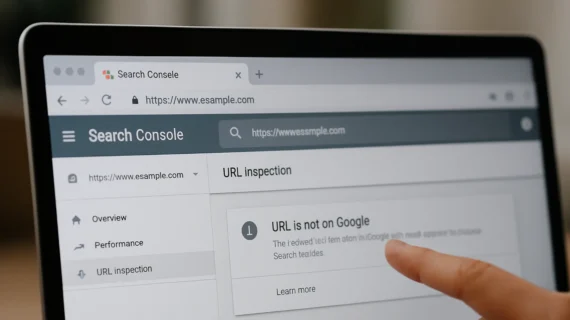
Open Google Search Console, paste the page URL into the URL Inspection Tool at the top, and read the verdict. ‘URL is on Google’ means indexed. Any other status, ‘URL is not on Google’, ‘Crawled – currently not indexed’, ‘Discovered – currently not indexed’, means Google either has not reached the page or has reached it and decided not to keep it. The site: operator (site:yourdomain.com/page-slug) gives a rough second check but is unreliable for pages added in the last few weeks.
Use Search Console as your primary source. The URL Inspection Tool shows the last crawl date, the crawl verdict, and whether a canonical conflict is redirecting indexing to a different URL. The site: search operator in Google is useful for a fast sanity check on older pages, but treat any absence there as a prompt to investigate in Search Console rather than a confirmed answer.
Six reasons Google skips WordPress pages, in the order they are most likely to bite you
1. WordPress’s ‘Discourage search engines’ checkbox is ticked
A single checkbox in WordPress sends a meta tag that tells Googlebot to stay out. Go to Settings > Reading and look for ‘Search Engine Visibility’. If the box labelled ‘Discourage search engines from indexing this site’ is checked, uncheck it and save. This is the first thing to rule out, because it affects the entire site at once and is often left on after a site is built in staging.
2. A noindex directive is set in your SEO plugin
Yoast SEO, Rank Math, and similar plugins let you set noindex at the page, post type, or taxonomy level. A page-level noindex overrides everything else. Open the SEO plugin’s metabox on the specific page, check the Advanced tab, and confirm the robots setting is not set to noindex. Also check the plugin’s global settings for the post type, for example, if ‘Pages’ or ‘Posts’ is set to noindex globally, individual pages inherit that.
3. The page has no inbound links from anywhere on the site
Google discovers URLs by following links. A page that is not linked from your navigation, from another post, or from your sitemap may simply never be found. Check whether the URL appears in your XML sitemap (usually at yourdomain.com/sitemap.xml) and whether at least one other page on your site links to it. Add an internal link and resubmit the URL in Search Console.
4. Your robots.txt file contains a Disallow rule covering the page
robots.txt sits at yourdomain.com/robots.txt. Look for any line that reads Disallow: / (blocks everything) or Disallow: /page-slug/ (blocks a specific path). A Disallow rule prevents Googlebot from fetching the page, so even a correctly published, linked page will stay out of the index. Remove or narrow the blocking rule and monitor recrawl in Search Console.
5. A canonical tag points to a different URL
The canonical tag tells Google which version of a URL is the ‘real’ one. If your page’s canonical points to a different URL, a paginated variant, an HTTP version, or a www versus non-www mismatch, Google will index that other URL instead of the one you expect. Use Search Console’s URL Inspection Tool and look at the ‘Google-selected canonical’ field. If it differs from the page’s own URL, find and fix the tag, usually in your SEO plugin or theme’s header template.
6. Google found the page but judged the content too thin or duplicate
Google crawls the page, decides the content does not add enough to warrant a separate entry in the index, and moves on. This happens with very short pages, pages that largely repeat content from another URL on your site, or pages that closely mirror content found elsewhere on the web. The fix is to add original, specific content that answers a distinct question, then request a fresh crawl in Search Console.
What about pages Google found but then dropped from the index?
Search Console’s Pages report (Index > Pages) shows two statuses that are often misread. ‘Discovered – currently not indexed’ means Google knows the URL exists but has not fetched it yet, often because crawl budget was spent elsewhere. ‘Crawled – currently not indexed’ means Google visited the page, processed it, and chose not to keep it.
These are different problems. A ‘Discovered’ backlog usually resolves as the site grows authority and earns more crawl activity. A ‘Crawled – currently not indexed’ verdict is a content quality signal: Google visited and walked away. More posts do not fix that. Publishing additional articles adds more URLs to the same crawl queue, but it does not change Google’s verdict on the pages it already reviewed and declined.
This is the core of the indexing-before-volume argument. If your Pages report shows dozens of ‘Crawled – currently not indexed’ entries, the answer is not to publish 20 more articles. The answer is to identify what made those pages inadequate, fix the underlying issue, and use Search Console to request recrawls. Only once existing pages are being retained does increasing volume make sense. Google’s own documentation on how Googlebot crawls, indexes, and serves content confirms that selection for the index is a quality decision, not a mechanical one.
How long does it take Google to index a new WordPress page?
Google Search Central states that indexing can take anywhere from a few hours to several weeks. There is no fixed timeline. Sites with strong inbound link profiles and frequent crawl activity tend to get new pages indexed faster. A new site with few external links pointing to it may wait weeks for a first crawl.
You can use the URL Inspection Tool in Search Console to request indexing on a specific URL. This moves the URL into a priority queue, but Google does not guarantee when or whether it will be processed. Do not interpret the request confirmation as a guarantee of indexing. The request accelerates the crawl; the decision to index still belongs to Google’s quality evaluation.
Consistent publishing of content that Google retains, and earning links from other indexed sites, is what increases baseline crawl frequency over time.
If fixing the technical causes still leaves you with thin coverage, what then?
Removing a noindex tag or fixing a canonical conflict does not create content. Once the technical blocks are gone, the next variable is whether your site publishes enough consistently relevant, indexable content to grow its footprint in search.
For owners who have resolved the technical issues but still publish sporadically, or not at all, because the drafting step never gets finished, the gap between ‘technically correct’ and ‘actually growing’ is a publishing cadence problem. An SEO autopilot for small WordPress sites handles the research-to-published step without requiring the owner to manage each article manually. The platform researches keywords, writes, generates images, and publishes to your WordPress on a schedule, so content accumulates rather than stalls in a drafts folder.
If you want to see specifically what that looks like end to end, the workflow for keyword research to published article without manual steps covers each stage from topic selection through to live post. The point is not volume for its own sake. It is consistent, indexed, linked content that gives Google a reason to increase crawl frequency and gives your site more surface area in search.
Frequently asked questions
Does submitting a sitemap guarantee Google will index my WordPress pages?
No. A sitemap tells Google which URLs exist; it does not obligate Google to index any of them. Google treats sitemap submissions as a hint, not a command. Pages that Google deems thin, duplicate, or low-quality may remain unindexed even after the sitemap is submitted and the crawl is confirmed in Search Console.
Can a WordPress page be indexed on one device but not another?
No. Google’s index is a single database: a URL is either in it or it is not. What can differ between devices is how a page renders or whether a redirect sends mobile users to a different URL. Check Search Console’s URL Inspection Tool on the exact URL your desktop and mobile versions resolve to. If they differ, you may have two separate indexing questions to answer.
Will adding more blog posts help Google index the pages it has already ignored?
Not directly. Publishing more posts does increase crawl activity on a site, but Google decides per-URL whether to retain a page. If existing pages have a noindex tag, a canonical conflict, or thin content, new posts do not fix those. Resolve the blocking causes on existing pages before scaling volume. Otherwise you are accumulating more pages in the same unindexed state.
My WordPress reading settings look correct. Why is my homepage still missing from Google?
The most common culprit after the reading setting is a noindex directive added by an SEO plugin on the homepage template itself. Open your SEO plugin’s settings for the front page, confirm that noindex is off, and then use Search Console’s URL Inspection Tool to request a fresh crawl. Also check that your homepage canonical tag points to itself and not to a paginated or filtered variant.
How often does Google recrawl a WordPress site?
Crawl frequency depends on the site’s authority, how often content changes, and how Google’s crawl budget is allocated across the web. A new site with few inbound links may be recrawled every few weeks. An established site updated daily may be recrawled within hours of a new post. There is no setting inside WordPress that controls this directly. Consistent publishing of indexed, linked content is the main signal that increases crawl frequency over time.
Fix the technical causes in the order listed above, confirm each one in Search Console before moving on, and only then think about publishing volume. In that sequence, growth compounds. Reversed, it stalls.