WordPress Plugin That Publishes Blog Posts Automatically: Scheduling vs. True Autopilot
What does ‘automatically publish’ actually mean in WordPress?
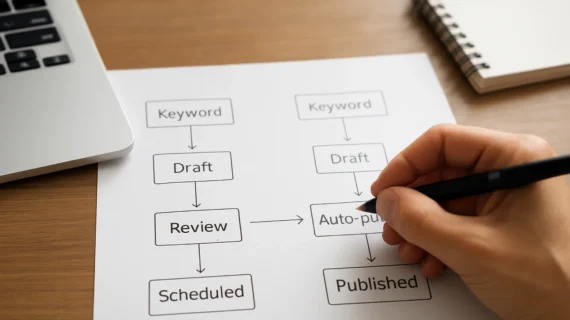
In WordPress, ‘automatically publish’ has two distinct meanings. The first is native post scheduling: you write the content, set a future date, and WordPress publishes it using its internal wp-cron system. The second is a full autopilot: a connected system researches a keyword, writes the article, generates images, and fires the publish action without any human input. Most plugins marketed as auto-publish only do the first. If you have no finished draft, a scheduling plugin does nothing.
This distinction matters before you spend a single minute evaluating plugins. Picture a concrete example: you write a draft on Monday, set the publish date for Friday at 9am, and a scheduling plugin fires it live at that time. That is scheduling. The plugin moved the clock hand. You still did every piece of work that makes the post worth reading.
A true autopilot does not wait for a draft. It starts from a keyword and ends with a live URL, without a human in the loop. Those are two fundamentally different categories of tool, and most search results for “wordpress plugin that publishes blog posts automatically” mix them together without explaining the gap.
Which plugins handle WordPress post scheduling reliably?
For owners whose bottleneck is timing rather than content production, four options cover most situations honestly.
Native WordPress scheduled posts (free). No plugin required. Set a future date on any draft and WordPress handles the rest using wp-cron, its built-in pseudo-cron system. The failure mode worth knowing: wp-cron only runs when a visitor loads a page on your site. On a low-traffic site, a post scheduled for 9am may not go live until hours later, because no page load happened near that window. The owner still provides all the content.
PublishPress. Adds an editorial calendar view and supports multi-author workflows. Useful when a small team is writing and an editor needs to see what is queued. It does not generate content; it organises and schedules what already exists.
WP Scheduled Posts. Drag-and-drop calendar interface with a queue mode that distributes posts across chosen time slots automatically. Good for batch-writers who produce several drafts at once and want to space them out. Same dependency as native scheduling: content has to exist before the plugin can do anything.
RSS-to-post bridge plugins. Tools in this category pull external RSS feeds and create draft or published posts from them. This comes closest to automated content sourcing, but the output is a repost of someone else’s content rather than original writing, which carries obvious duplication and authority risks.
The common thread across all four: they solve a timing problem, not a content problem. If your drafts folder is empty, none of these tools move the needle.
Why do most WordPress sites still have a drafts folder full of unpublished posts?
Scheduling plugins assume finished content exists. For most small-site owners, that assumption fails before it even gets tested.
The real bottleneck sequence looks like this: a keyword idea surfaces, research stalls because finding authoritative sources takes longer than expected, the draft sits at 40 percent complete, something else comes up in the business, and the post never gets finished. Multiply that by four posts a month and the drafts folder becomes a graveyard of good intentions.
Running eight live sites in parallel makes this pattern impossible to ignore. The constraint is never the scheduling infrastructure. WordPress can schedule a post in three clicks. The constraint is always time-to-publish from initial keyword idea: the full elapsed time between “I should write about this” and a live, indexed URL. That is the metric that matters, and it has nothing to do with which plugin is installed.
On a site getting 200 visits a month, the operator is also the writer, the researcher, the editor, and the person doing the publishing. A scheduling plugin adds zero value to that person’s workflow because the blocking step happens long before the schedule ever gets set.
This is the gap that separates a scheduling tool from a pipeline system. One manages the end of a process that most small-site owners never get to. The other handles the entire process from the beginning.
What would a true auto-publishing system do that a scheduling plugin cannot?
A full pipeline system covers every step that a scheduling plugin skips. Here is what that sequence looks like, and where a scheduling plugin fits inside it.
- Keyword selection. The system identifies a target keyword based on search volume, competition, and topical relevance to the site. A scheduling plugin does not touch this step.
- Article research and writing. The system produces a complete draft using the keyword and supporting research. A scheduling plugin does not touch this step.
- Image generation. The system creates or sources images for the post. A scheduling plugin does not touch this step.
- Publish to WordPress. The system fires the post live via REST API or XML-RPC. This is the only step a scheduling plugin handles, and it only handles it if the previous three steps were completed by a human first.
- Social post drafting. The system drafts platform-native social copy for each connected network based on the article. A scheduling plugin typically sends only a link and excerpt.
- Search Console monitoring. The system checks whether the published post was actually indexed, not just whether it went live.
That last step is where most site owners have a blind spot. Strategift’s AutoSEO connects to Search Console and Analytics so the owner can see whether published posts are indexed, not just whether they went live in WordPress. Publishing and indexing are two separate events. A post can sit live on your site for weeks without Google ever crawling it. A system that monitors indexing status as it publishes catches that problem before it wastes months of content effort.
How do you know if your auto-published posts are actually indexed?
Open Google Search Console, go to URL Inspection, and paste the post’s URL. The result will show one of three statuses: indexed, discovered but not indexed, or not found. ‘Published’ and ‘indexed’ are different events. A post can go live in WordPress and sit unindexed for weeks if Google has not crawled it. Before adding more content volume, check the Coverage report to confirm your existing posts are indexed. Publishing more into a crawl backlog does not accelerate indexing.
The Coverage report (now labelled Pages in newer Search Console interfaces) groups your URLs by status. “Submitted and indexed” is where you want posts to land. “Discovered but not indexed” means Google knows the URL exists but has not yet crawled it, often because crawl budget is being allocated elsewhere on your site.
If a significant share of your posts sit in the “discovered but not indexed” bucket, adding more posts compounds the problem. Google’s crawling and indexing documentation confirms that crawl budget is a finite resource. Spreading it thinner by publishing more before existing posts are indexed slows the whole queue.
The practical recommendation: run a Coverage check before installing any new publishing plugin or increasing content frequency. Know your current indexed-to-published ratio before you add volume.
Which type of WordPress auto-publishing setup fits your site right now?
Three profiles cover most small-site situations. Be honest about which one matches your actual workflow.
Profile A: You have content ready but keep forgetting to publish it. Native WordPress scheduling or WP Scheduled Posts is sufficient. Set the dates, let the queue run. The problem is timing, and a scheduling plugin solves a timing problem.
Profile B: You have a small team writing but no editorial process. PublishPress or a tool like CoSchedule adds the calendar and approval layer your workflow is missing. The bottleneck is coordination, not content production.
Profile C: No team, no time to write, need consistent inbound traffic from search. A full pipeline system is the only option that addresses the actual constraint. For this profile, AutoSEO solution packages cover the full sequence: keyword research, article writing, image generation, publishing to WordPress on a schedule, social post drafting, and Search Console monitoring.
One honest requirement worth stating plainly: AutoSEO connects to a self-hosted WordPress site reachable over HTTPS. It is not compatible with WordPress.com free plans or sites behind authentication walls. It is also not the right fit for every budget or every niche. A site that needs one post a month may find the economics don’t justify a full pipeline system. Profile A or B tools cost nothing or very little for that use case.
The real cost of doing this manually versus using an automated publishing system
Time-to-published-post at industry average is 3 to 5 hours per article when you include keyword research, writing, editing, image sourcing, formatting, and the publish action itself. At a conservative operator hourly rate of $30, one post costs $90 to $150 in time. Four posts a month is $360 to $600 in time cost before any tool is added to the budget.
Those numbers come from tracking time across eight live sites, not from a vendor benchmark. The 3 to 5 hour range is an estimate; actual time varies by niche complexity and writer speed. What is not an estimate is that the cost is real whether or not it appears on an invoice, because time spent writing is time not spent on the work that actually runs the business.
Before deciding whether a flat monthly system cost makes sense against that time number, it is worth taking a few minutes to estimate the return before committing to a tool. A system that ships four posts a month and monitors whether they index and rank changes the economics, but only if the site and niche support the volume. Run the numbers for your own situation first.
Frequently asked questions
Can WordPress publish posts automatically without any plugin?
Yes. WordPress has a built-in scheduled post feature that uses wp-cron. You set a future publish date on any draft, and WordPress publishes it when that time arrives, provided a site visitor triggers wp-cron by loading a page around that time. On very low-traffic sites, the timing can slip by hours. No additional plugin is required for basic scheduling, but the content still has to be written before you schedule it.
What is the difference between a scheduling plugin and an auto-publishing system?
A scheduling plugin manages when a finished draft goes live. An auto-publishing system handles everything before that: picking a keyword, researching the topic, writing the article, generating images, and then publishing on a schedule. The scheduling plugin assumes content exists. An auto-publishing system produces the content. If your bottleneck is writing and researching, a scheduling plugin will not help.
Why do my WordPress scheduled posts sometimes not publish on time?
WordPress uses wp-cron, a pseudo-cron system that only runs when someone visits the site. If no visitor loads a page near the scheduled time, the publish action is delayed until the next visit. Sites with sparse traffic are most affected. The fix is either to use a real server-side cron job that calls wp-cron on a fixed interval, or to use a plugin like WP Crontrol to monitor and trigger missed events.
Does auto-publishing affect SEO negatively?
Publishing frequency itself does not harm SEO. What harms it is publishing content that is thin, duplicate, or not indexed. If an auto-publishing system ships a high volume of low-quality posts before the previous ones are indexed, crawl budget gets spread thin and indexing slows further. The risk is not automation; it is volume without quality control. A system that monitors Search Console coverage as it publishes catches this problem before it compounds.
Can an auto-publishing plugin also post to social media?
Some plugins can push a WordPress post to connected social accounts at publish time. These send a link and excerpt, not a platform-native post written for the audience on that network. A full pipeline system can draft social copy separately for each connected network based on the article content, which typically produces better engagement than an auto-shared link.
Is automated WordPress publishing safe for a site’s Google rankings?
Google’s guidance is clear that automatically generated content is not inherently against its policies; the standard is whether it is helpful and written for people. Content that answers real search queries with accurate, specific information can rank regardless of how it was produced. Content that is generic, padded, or keyword-stuffed will not rank whether a human or a system wrote it. The production method is not the risk; content quality and indexing health are.
If your site is in profile C and the time cost calculation above reflects your reality, the next step is to see the full pipeline in action. See how AutoSEO researches, writes, and publishes to your WordPress site.