How to Automate Content Publishing to WordPress: From Keyword Research to Live Post
What Does ‘Automate Content Publishing’ Actually Mean?
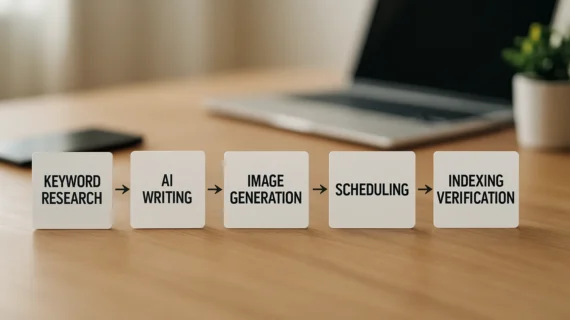
Automating content publishing means a system selects a keyword, writes the article, generates images, and publishes the post to your WordPress site on a schedule, without you pasting anything. Most tools cover one step: they write a draft and hand it back. Full automation covers the whole chain, including the final step most tutorials skip: checking whether Google actually indexed the URL after it went live.
There is a wide spectrum between “scheduled draft” and “true autopilot.” At the manual end, you write the post, format it, copy it into WordPress, add the featured image, write the meta description, and hit publish. A writing tool moves you one step forward: it drafts the text. You still do everything else.
For a small site owner, that remaining work is the actual bottleneck. Research shows the copy-paste step is where content pipelines stall. The article sits in a Google Doc for two weeks, then three, then it never goes up. The problem is not a shortage of ideas or even writing time. It is the finishing and publishing steps that do not happen consistently. Full automation removes those steps from your to-do list entirely.
Step 1: Automated Keyword Research, Picking What to Publish
Full automation starts upstream, before anyone writes a word. If the keyword selection is manual, the pipeline will eventually break. Operators pick a few obvious terms, run out of ideas within a month, and publishing goes quiet. That silence costs more than a bad article would.
A proper automated system evaluates candidates against four criteria: search volume, keyword difficulty, intent match for the site’s product or service, and whether the site already has a page targeting that intent. Publishing a second article into a keyword you already rank for does not move the needle. Publishing into an uncontested gap does.
What a system does instead of waiting for you to think of something: it scans a seed topic list or a competitor gap report on a schedule, scores each candidate by opportunity, and surfaces the ones worth writing next. No brainstorming session required.
Strategift’s AutoSEO runs this as the first step of the pipeline. You define the topic territory for your site once. The system works the opportunity queue from there, so publishing continues at pace even when you have not thought about your content calendar in three weeks.
Step 2: AI Writing That Produces a Publishable Draft, Not a Starting Point
There is a meaningful difference between a writing assistant and a publishing system. A writing assistant gives you text to edit. A publishing system produces something it will put live.
For a draft to be publishable without human editing, it needs several things to be correct at generation time:
- Correct heading hierarchy: H1 once, H2 for main sections, H3 for sub-points
- Factual claims narrow enough to verify, not broad assertions that drift into hallucination
- Internal links inserted during generation, not added manually after the fact
- Meta title within 60 characters and meta description within 160 characters
- Word count and depth calibrated to the competitive set for that query, not a default template
The honest limitation here is real. AI writing at this level requires a well-scoped brief and a topic narrow enough that the risk of confident-sounding wrong information stays low. This is exactly why keyword scoping in step 1 matters. A broad, ambiguous keyword produces a broad, ambiguous brief, which produces a draft that needs editing before it can go live. A precise keyword, specific product, specific buyer question, produces a draft that holds up.
The system is not a replacement for subject matter expertise on complex technical claims. It is reliable for the structured, search-intent-matched content that inbound enquiries depend on.
Step 3: Automated Image Generation and Alt-Text Assignment
Most content pipelines generate text and stop. A post published without a featured image looks unfinished in search result previews and across any social share. That matters for click-through rate before a word of the article is read.
Automated image generation works like this in practice: the system derives a prompt from the article title and primary keyword, generates an image, uploads it directly to the WordPress media library, sets it as the featured image, and writes alt text from the keyword. No manual upload, no forgetting to add alt text.
Format matters for page speed. WebP delivers smaller file sizes than JPEG or PNG at equivalent visual quality. A pipeline that generates and uploads images in WebP keeps your page speed scores from degrading as the post count climbs. This is one of those details that seems minor on post 1 and becomes a real problem by post 50.
Image generation is a supporting step in the pipeline, not the centrepiece. But skipping it consistently is a quality signal that accumulates against the site over time.
Step 4: Scheduling and Publishing Directly to WordPress via API
WordPress accepts authenticated POST requests through its REST API. A system sends a request containing the post title, body, meta fields, featured image ID, and a publish timestamp. WordPress creates and schedules the post exactly as if you had done it through the dashboard.
No plugin installation is required on the WordPress side. Authentication uses an application password you generate inside your WordPress user profile. The setup takes about two minutes. The only requirements on the site: it must be self-hosted, reachable over HTTPS, and have the REST API enabled. The REST API is on by default in every current WordPress installation.
This is different from plugin-level scheduling, and the difference matters more than it sounds. For a detailed comparison of how scheduling plugins compare to a full autopilot, the adjacent piece covers that in detail. The short version: plugins require you to have already imported content into WordPress. API-level publishing handles the import and the scheduling as a single step.
Tools that export a Google Doc or send you an email with the content for you to paste in have not automated publishing. They have automated drafting. The paste step is still yours, and that step is where most pipelines break.
Step 5: Indexing Verification, How Do You Know It Actually Got Into Google?
Publishing a post does not mean Google has indexed it. Check Search Console’s URL Inspection tool for the exact URL within 48 hours of publishing. If the status shows ‘Discovered but not indexed,’ the most common fixes are adding an internal link from an already-indexed page and submitting the sitemap. New sites on low authority domains can wait 2-6 weeks regardless of correct technical setup, a number worth knowing before you judge whether a piece is performing.
Every tutorial on automated WordPress publishing stops at the publish step. Indexing is where the result actually happens.
Use Search Console’s URL Inspection tool on each published URL. The Coverage report shows URLs in “Discovered but not indexed” or “Crawled but not indexed” status. These are not the same problem. “Discovered but not indexed” usually means Google knows the URL exists but has not prioritised it. An internal link from an already-indexed page and a sitemap ping address that directly.
An automated system can poll the Search Console API, log the indexing status of every published URL, and flag transitions from submitted to indexed without you checking manually. That is what “autopilot with reporting” means in practice. The system does not just publish. It tells you whether publishing did anything.
What Breaks When You Try to Scale This Without a System
Half-automated pipelines have predictable failure points. Running this process across eight live sites surfaces them at a pace one site never would.
- Content sits in drafts. The paste step did not happen. The article exists somewhere but is not live.
- Images get skipped. Posts go live without featured images. Search previews look bare. Social shares show no thumbnail.
- Internal links never get added. New posts sit without links from existing content. Google finds them slowly or not at all.
- No one checks indexing. The last 10 posts may be in “Discovered but not indexed” status. Traffic attribution is meaningless when the pages are not in the index.
- Page speed degrades silently. Large image files accumulate post by post. By the time it shows in a speed audit, the damage covers dozens of URLs.
Each of these breakpoints is individually fixable. The problem is that fixing them requires someone to check, and checking requires time on a schedule. Without a system, the check does not happen. This is the real cost of a half-automated pipeline: not the missing step itself, but the compounding effect of missing steps that no one has the time to monitor.
How Strategift AutoSEO Runs This Pipeline Unattended
AutoSEO runs each step above without requiring you to move between tools or finish a step manually. Keyword selection, article generation, image creation, WordPress publishing, and Search Console indexing checks all run from one pipeline connected to your site.
Setup requires connecting your WordPress site with an application password and specifying your target topic area. That takes under 30 minutes. From there, the system runs on schedule.
Current honest state: across the operator’s own portfolio, one site in the AutoSEO pipeline is producing impressions in the low thousands over the last 28 days with average position in the mid-30s, consistent with a site in its first indexing phase. These are real Search Console numbers from a live property, not projections.
What AutoSEO cannot do yet: paid traffic automation and social post publishing are in development, with channel access opening as each network approves the app. Those are not available today.
See AutoSEO plan details for current pricing. If you are weighing the time saving against the monthly cost, the estimate whether the time saving justifies the cost calculator works through that arithmetic directly.
Frequently Asked Questions
Does automating WordPress posts hurt SEO?
Automation does not hurt SEO. Thin, duplicated, or factually wrong content does. A system that publishes well-scoped, keyword-matched articles with correct metadata is indistinguishable from a human-scheduled post in Google’s evaluation. The risk is in the content quality, not the publishing mechanism.
Can I automate content publishing on WordPress.com?
Most API-based automation requires a self-hosted WordPress site running over HTTPS. WordPress.com’s free and personal plans restrict REST API access from third-party apps. Business and Commerce plans on WordPress.com allow some plugin installs and API access, but self-hosted gives you the most control.
How long does it take to set up automated WordPress publishing?
With a platform like AutoSEO, setup is connecting your WordPress site via an app password and pointing the system at your target topics. That takes under 30 minutes. Building a custom pipeline with Zapier or Make connecting separate AI writing and publishing tools takes several hours and requires ongoing maintenance when any connected service changes its API.
What happens if the automated post contains an error?
Posts published via the WordPress REST API exist in your WordPress database like any other post. You can edit, unpublish, or delete them from the WordPress dashboard exactly as you would a manually written post. A good automation system logs every published URL so you know which posts to review.
Do I need to install a plugin on my WordPress site to connect it to an automation system?
No. WordPress’s built-in REST API handles authenticated requests using an application password you generate in your WordPress user profile. No plugin installation is required on the WordPress side. The authentication takes about two minutes to set up and does not require access to your hosting server or FTP.
How do I know if my automatically published posts are getting indexed by Google?
Check Google Search Console. Add your site property if you have not already, then use the URL Inspection tool on each published URL within 48 hours. The Coverage report shows any URLs in “Discovered but not indexed” or “Crawled but not indexed” status. An automated system can poll the Search Console API and log indexing status without you checking manually.
Start Running the Full Pipeline
The difference between a content pipeline that produces results and one that stalls in drafts is whether every step runs without waiting for you. Keyword selection, writing, image generation, publishing, and indexing verification are all steps that can run unattended. Most tools handle one. AutoSEO handles the chain.