For a healthy WordPress site with a submitted XML sitemap, Googlebot typically indexes a new post within 24 to 72 hours of publication. Sites with strong crawl authority, frequent publishing, many indexed pages, inbound links, can see indexing in under 4 hours. Sites with thin content history or no submitted sitemap may wait 1 to 4 weeks. There is no guaranteed timeline. The steps below compress that window as far as the site’s authority allows.
Why Google Does Not Index a New Post the Moment You Publish
Googlebot is not listening for your publish button. It crawls the web on its own schedule, shaped by three factors: your site’s crawl budget (how many pages Google is willing to fetch in a given period), your site’s authority (how often Google judges it worth revisiting), and how Google actually discovers the URL in the first place.
When you hit Publish in WordPress, nothing notifies Google in real time. Your SEO plugin may send a sitemap ping, which tells Google the sitemap file has changed, but that is a hint, not an instruction. Google decides when to act on it.
Submitting a sitemap does not guarantee same-day indexing. Requesting indexing in Search Console does not either. What this guide covers is the ordered sequence of actions that removes blockers and stacks the signals so Google finds and evaluates your post as quickly as your site’s authority allows.
Step 1: Confirm the Page Is Publicly Crawlable Before You Do Anything Else
If a blocker is in place, every submission step below is wasted effort. Two checks catch the majority of indexing failures before you open Search Console.
Check your robots.txt file. Visit yourdomain.com/robots.txt in a browser. Look for any Disallow directive that covers your post URL or the /wp-content/ directory. A misconfigured robots.txt can silently block Googlebot from crawling entire sections of your site. If you see Disallow: /, every page on the site is blocked.
Check for a noindex tag on the post itself. In the WordPress editor, open the Yoast SEO panel (the block at the bottom of the post or in the sidebar). Go to the Advanced tab. Look for the field labelled “Allow search engines to show this post in search results.” It should be set to “Yes.” In Rank Math, open the General tab inside the post editor panel and confirm “robots meta” does not include “noindex.” Either plugin can have this set incorrectly at the individual post level, overriding your site-wide settings.
Also confirm: the post status is “Published” and the post is not password-protected. A password-protected post returns a 200 status but is not crawlable by Googlebot.
These checks take under two minutes. If they are clean, you have ruled out the most common reasons for a permanent block. The deeper diagnostic path for persistent cases is covered in the guide on why WordPress pages are not indexed by Google.
Step 2: Use the URL Inspection Tool in Google Search Console to Request Indexing
This is the primary direct action available to any site owner after publishing.
- Open Google Search Console and select your property.
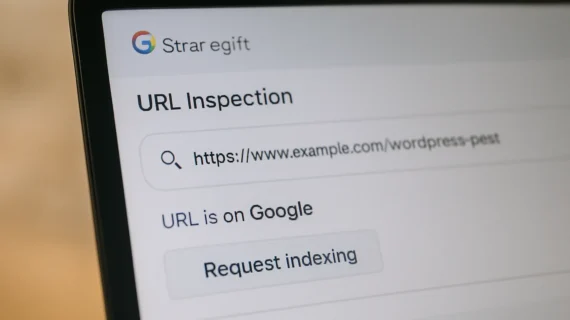
- Paste the full post URL into the inspection bar at the top and press Enter.
- Read the result. “URL is on Google” means the page is already indexed. “URL is not on Google” means it has not been indexed yet.
- Click “Request Indexing.” Google adds the URL to its crawl queue.
According to Google’s own Search Console documentation, this tool has a soft limit of approximately 10 to 12 URL inspection requests per day per property. One request per URL is sufficient. Google processes the queue within hours to a few days, not instantly.
This step does not override a noindex tag or a robots.txt block. If Step 1 is not clean, the request is queued and then ignored when the crawler evaluates the page.
Does requesting indexing in Search Console guarantee the post will be indexed?
No. The “Request Indexing” button in the URL Inspection Tool tells Google to add the URL to its crawl queue, not to index it. Google’s crawler still evaluates the page against its quality and relevance signals before deciding to index it. If the page has a noindex tag, blocks in robots.txt, thin content, or duplicate content issues, the request is ignored. Clearing those blockers first is what Step 1 of this guide covers.
Step 3: Make Sure Your XML Sitemap Is Submitted and Updated
Most WordPress SEO plugins handle sitemap generation automatically, but you should verify three things:
- The sitemap file exists. Visit
yourdomain.com/sitemap.xmloryourdomain.com/sitemap_index.xml. If neither loads, your plugin’s sitemap feature may be disabled. - The sitemap is submitted in Search Console. In the left menu, go to Sitemaps. The sitemap URL should appear there with a “Success” status and a recent fetch date.
- Your new post URL appears inside it. Open the sitemap file and search for the post slug. If it is missing, check whether the post type is excluded from your plugin’s sitemap settings.
A sitemap is a crawl hint, as Google’s sitemap documentation makes clear. It tells Googlebot which URLs exist, but Google decides when to visit them and whether to index them. A healthy sitemap on a small site typically results in Googlebot visiting new URLs within 24 to 48 hours, but that is a pattern, not a promise.
Step 4: Add an Internal Link from an Already-Indexed Page
This is the most underused step in the sequence. Googlebot follows links. If a page that is already indexed, such as your homepage, a popular category page, or a related post, links to the new post, Googlebot will discover it on its next scheduled crawl of that page.
To do this effectively: open URL Inspection for one of your recently crawled pages (the “Last crawl” date is visible in the inspection result). Go to that page in the WordPress editor and add one contextual sentence that links to the new post. It does not need to be prominent, it needs to be a real, followed link in the body of the page.
For low-authority sites that publish infrequently, one internal link from an already-indexed page is often faster than a sitemap ping. The sitemap tells Google a URL exists. An internal link gives Googlebot a path to walk to it on a schedule it already keeps.
Step 5: Publish a Social Share or Send a Fetch Signal via IndexNow
Two lightweight amplifiers worth knowing about, without overstating either.
Public social share. Posting the URL publicly on a platform Googlebot crawls creates an external link. The effect is inconsistent and depends on how often Google visits that platform. It is a secondary signal, not a reliable indexing method on its own.
IndexNow. This is a protocol supported by Bing and Yandex that notifies participating search engines immediately when a URL is published or updated. Rank Math has built-in IndexNow support. You can read the full protocol documentation at indexnow.org. Google does not formally support IndexNow, but faster Bing indexing can sometimes correlate with Google discovery. Neither path is a guaranteed shortcut for Google specifically.
What to Check at the 48-Hour and 7-Day Marks
Stop refreshing Google search results every hour. Use a review cadence instead.
At 48 hours: re-run URL Inspection for the post. If it now shows “URL is on Google,” you are done. If it still shows “Not indexed,” check the Coverage report (Index, then Coverage in the left menu) and filter by the URL. Look for the “Discovered, currently not indexed” status. This means Googlebot found the URL in your sitemap or via a link but has not yet crawled and evaluated it. It usually signals that Google is deprioritising the URL, often because the site publishes infrequently or has many thin pages. Adding a strong internal link from an already-indexed page is the fastest remedy at this stage.
At 7 days: filter the Search Console Performance report by the post’s URL. If any impressions have appeared, Google has indexed it and it is appearing in search results for at least some queries. If impressions are zero and URL Inspection still shows “Not indexed,” the issue is no longer a timing question. Return to the full diagnostic guide on why WordPress pages are not indexed by Google and work through the content quality and technical checks there.
How Consistent Publishing Frequency Trains Googlebot to Crawl More Often
The five steps above are immediate actions. The longer-term lever is publishing cadence.
Google allocates crawl budget partly based on how often a site changes. A site that publishes new content on a predictable schedule, say, weekly, signals to Googlebot that returning frequently is worth the crawl cost. Over months, that site gets crawled more often, which means new posts get discovered and indexed faster without any manual submission steps.
A site that publishes once every two months gets crawled less often. That is why the manual steps in this guide matter more for infrequent publishers: they are compensating for a crawl cadence Google has not yet built for that site.
The compounding effect kicks in when publication is consistent. If AutoSEO publishes on a consistent schedule, that pattern builds over time without the owner remembering to manage it. The crawl frequency reward is a byproduct of showing up regularly, and it makes every subsequent post easier to index than the last.
Quick Reference: The Indexing Sequence in Order
- Confirm crawlability. Check robots.txt and the noindex setting on the post. Fix any block before doing anything else.
- Request indexing in Search Console. Paste the URL into URL Inspection and click Request Indexing. One request per URL.
- Verify your XML sitemap. Confirm it exists, is submitted in Search Console, and includes the new post URL.
- Add an internal link. Edit an already-indexed page and link contextually to the new post.
- Share publicly and check IndexNow. Secondary signals. Useful but not primary.
This sequence works for any self-hosted WordPress site reachable over HTTPS. For owners who want the publishing cadence managed automatically, see what an SEO autopilot actually does for a small WordPress site.
Frequently Asked Questions
Why is my WordPress post showing “Discovered, currently not indexed” in Search Console?
This status means Googlebot found the URL in your sitemap or via a link but has not crawled and indexed it yet. It usually signals that Google is deprioritising the URL, often because the site publishes infrequently or has many thin pages. Adding a strong internal link from an already-indexed page and improving publishing frequency are the two fastest remedies.
Does sharing a new post on social media help Google index it faster?
It can, indirectly. A public social post creates an external URL that Googlebot may follow during its crawl of that social platform. The effect is inconsistent and depends on whether Google crawls that platform frequently. A direct internal link from an indexed page on your own site is more reliable. Social sharing is a secondary signal, not a primary indexing method.
How many indexing requests can I submit per day in Google Search Console?
Google’s documentation indicates a soft limit of approximately 10 to 12 URL inspection requests per day per Search Console property. Submitting at that pace for a single new post is unnecessary: one request per URL is enough. If you have a batch of new posts, prioritise your highest-value pages first and submit the rest over subsequent days.
Will a WordPress SEO plugin automatically ping Google when I publish a new post?
Most major plugins, including Yoast SEO, Rank Math, and AIOSEO, send a sitemap ping to Google when a new post is published. This notifies Google that the sitemap has changed but does not force immediate crawling. You should still verify the post appears in your sitemap and run a manual URL Inspection request for posts you need indexed quickly.
Does publishing more frequently make Google index my new posts faster?
Yes, over time. Google allocates crawl budget based partly on how often a site updates. Sites that publish on a consistent schedule, weekly for example, train Googlebot to return more frequently. A site that publishes once every two months gets crawled less often. Building a reliable publishing cadence is the only sustainable way to compress indexing time without relying on manual Search Console requests.
See how AutoSEO publishes on a schedule so Googlebot keeps coming back https://strategift.com/autoseo-keyword-research-to-published-article/