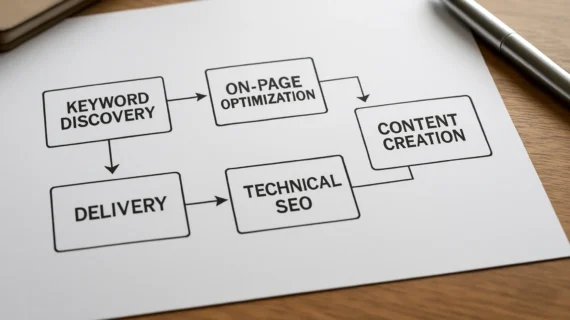
What does an AutoSEO tool actually do from keyword research to live post?
AutoSEO runs a six-stage pipeline without requiring the operator at each step. It identifies a keyword from your topic seeds, scores it for search volume and competition, writes a structured article with H1, H2s, meta fields, and alt-tagged images, then publishes directly to your WordPress site via the REST API on a schedule you set. After publication, it checks Search Console to confirm the URL is indexed and tracks impressions and average position over time. The operator sets the schedule and reviews reports. The pipeline runs unattended between those two checkpoints.
Most AI writing tools stop at stage three. They hand you a draft and every step after that, finding an image, writing the meta description, logging into WordPress, uploading, formatting, publishing, is yours to complete. That hand-off step is where publishing cadence collapses for small-site operators. A tool that stops at draft generation is a faster way to create a backlog, not a way to get articles live.
AutoSEO closes the gap between written and published. The keyword is researched programmatically. The article is generated with a defined structure. Images are created and labelled. The post is scheduled and pushed to WordPress via the REST API. Search Console is queried after publication to confirm the URL is crawlable and to begin tracking performance. For a deeper walkthrough of each stage, see how the content publishing pipeline works step by step.
Why does the scheduling step matter if the article is already written?
A written article that is not published has no URL, so Google cannot crawl it and Search Console cannot report on it. Scheduling with actual WordPress publication converts a draft into a live, indexable page. Operators who generate content with AI writing tools but paste it manually tend to publish 2-4 articles per month because the hand-off step stalls. A scheduled pipeline that writes and publishes without waiting for manual action can sustain a daily cadence on the same operator time budget.
The indexing chain is sequential and unforgiving. An article must exist in WordPress before Googlebot can discover it. Googlebot must crawl it before Search Console can report on it. Search Console must record impressions before you have any data to act on. Skipping the publication step breaks the chain at the first link. A draft in a tool dashboard or a local folder contributes nothing to that sequence.
Scheduling is also a consistency lever. Google’s crawl allocation to a site correlates with how predictably new content appears. A site that publishes once a week on a consistent schedule conditions crawl behaviour differently from a site that publishes five articles in one day and then nothing for six weeks. That consistency is only achievable if the publication step does not depend on operator availability. For more on why this distinction matters in practice, read scheduling versus true autopilot: the difference that determines whether articles actually ship.
How AutoSEO picks keywords without you building a spreadsheet
The keyword selection stage uses three signals: estimated search volume, competition level, and topical relevance to your site’s existing content cluster. The system starts from topic seeds you provide during onboarding. Those seeds define the domain the tool operates in. AutoSEO does not pick topics outside that boundary unless you expand the seeds.
Before assigning a keyword to the publishing queue, the system checks your site’s indexed pages. If a URL already exists for a topic, the keyword is deprioritised to avoid publishing a second page that competes with the first. This is not a substitute for a full content audit, but it reduces the most common form of self-cannibalisation: two articles targeting nearly identical queries.
What the operator controls:
- Topic seeds that define the relevant subject area
- Terms or phrases to exclude from targeting
- Whether the publishing queue runs automatically or holds for manual approval
What the system controls within those constraints:
- Which specific keyword is selected from the candidate pool
- Scoring against volume, competition, and existing coverage
- Assignment order in the queue
AutoSEO does not claim to pick the best keyword. It applies defined criteria and surfaces the result. Operators who want to override the selection can do so by approving or skipping items in the queue before publication.
What the published article looks like and what AutoSEO does not touch
Each published article includes an H1, structured H2 and H3 headings, a meta title, a meta description, body text, and images with descriptive alt text. Image file names are set during generation, not left as generic strings. Word count typically falls in the 900-1400 word range depending on keyword complexity and the content parameters set during setup. Internal linking is handled where the system identifies relevant existing pages on your site.
What AutoSEO does not do:
- Guarantee a ranking position for any keyword
- Rewrite existing pages unless explicitly instructed to do so
- Manage paid search or display campaigns
- Replace a full technical SEO audit
The measurement framework the buyer should use to evaluate output is straightforward. At 28 days post-publication, check Search Console for impressions and average position. At 90 days, the position average is more stable and gives a reliable signal of whether the article is gaining traction. Neither number is a guarantee. A competitive keyword against an established SERP takes longer. A low-competition informational query on a niche topic can show movement inside 30 days. The data from Search Console is the ground truth, not the tool’s claims.
For a realistic picture of what those numbers look like on a live site, including the weak results alongside the gains, see what the autopilot skips and what the numbers show at 90 days.
Which WordPress sites AutoSEO works with and what the setup requires
AutoSEO connects to any self-hosted WordPress installation reachable over HTTPS with the REST API enabled. There is no restriction by hosting provider. WP Engine, Kinsta, SiteGround, and standard cPanel hosts running WordPress all work. Managed WordPress.com plans that disable third-party REST API write access will not work, which covers most WordPress.com paid tiers.
The Search Console property must be connected and verified before AutoSEO can pull coverage and performance data. Without that connection, the reporting layer does not function, though publishing still works.
During onboarding, the operator completes three steps:
- Connects WordPress credentials so the REST API write access is authorised
- Connects the Search Console property for the site
- Sets topic seeds and a publishing schedule
AutoSEO is not geofenced. It works globally. The primary language for content generation is English. Indonesian and Malay interface options are available. If your site is self-hosted WordPress, reachable over HTTPS, with REST API access live, you qualify technically. Everything else is configuration.
What does AutoSEO cost and what does the alternative cost in operator time?
Pricing is listed on the full solution packages and what each tier includes page. Read that before continuing here, because the time comparison only makes sense against a number you have already seen.
The honest time cost of doing this manually for one article:
- Keyword research: 20-40 minutes
- Writing a 1200-word article: 2-3 hours
- Sourcing or creating images: 30-60 minutes
- Uploading, formatting, adding meta fields, and publishing: 30-45 minutes
One article per week runs to roughly 15-20 operator hours per month. At four articles per week, that is a part-time role. AutoSEO does not eliminate all of those hours for every operator. The operator still sets seeds, reviews the queue if they choose, and reads the Search Console reports. What the system eliminates is the execution chain: research, write, format, image, upload, publish, check indexing. That chain does not run itself without the tool.
For operators who want to model whether the traffic return justifies the cost before committing, the model your expected return before committing page walks through the estimation framework. For sites that are pre-revenue or early stage, Early Bootstrap Packages for new sites exist specifically for that entry point.
Frequently asked questions about AutoSEO scheduling and publishing
Does AutoSEO work with any WordPress site or only specific hosting providers?
AutoSEO connects to any self-hosted WordPress installation reachable over HTTPS with the REST API enabled. It is not tied to a specific hosting provider. Managed WordPress plans that disable third-party REST API write access, including most WordPress.com paid tiers, will not work. If you are on WP Engine, Kinsta, SiteGround, or a standard cPanel host running WordPress, the connection works.
Can I control which keywords AutoSEO targets or does it decide everything?
You set topic seeds and can exclude terms you do not want targeted. AutoSEO scores candidates against search volume, competition, and your site’s existing content to avoid publishing a second page on a topic already covered. The final keyword selection is made by the system within those constraints. You review the publishing queue before articles go live if you want that checkpoint, or you let the schedule run without review.
How long does it take to see Search Console data after AutoSEO publishes an article?
Google typically discovers a new WordPress post within 1-14 days when the site has an active XML sitemap and existing crawl budget. Search Console begins reporting impressions once the URL appears in search results for at least one query. Meaningful position data, where averages stabilise enough to be actionable, usually requires 28-60 days and depends on how competitive the keyword is. AutoSEO pulls Search Console data and surfaces it in the dashboard; it does not speed up Google’s crawl schedule.
Will AutoSEO publish articles that duplicate content already on my site?
The keyword selection stage checks your site’s indexed pages before assigning a topic. If a URL on your site already ranks or is indexed for a term, AutoSEO deprioritises overlapping keywords. It is not a substitute for a manual content audit, and edge cases can occur when two pages target adjacent but distinct queries. The operator can manually exclude topics from the queue at any time.
Does AutoSEO post to social media as well as WordPress?
Social posting is part of the Strategift platform roadmap but channel availability depends on third-party network API approvals, which open in sequence. AutoSEO today covers search and content: keyword research, article generation, and WordPress publication with reporting from Search Console and Analytics. Social drafts tied to each published article are on the roadmap. Check the current solution packages page for the live channel list at the time you sign up.
What happens if Google does not index the articles AutoSEO publishes?
AutoSEO monitors Search Console coverage and flags URLs that are published but not indexed. Common causes include a site-wide crawl budget problem, a robots.txt exclusion, or a noindex tag inherited from a theme setting. The platform surfaces the issue in the dashboard. Resolving it typically requires fixing the underlying technical problem on the WordPress site itself, which AutoSEO can identify but cannot patch automatically if the root cause is a theme or plugin conflict.
If your site has the articles but not the publishing cadence, or the drafts but not the live URLs, AutoSEO closes that gap. Keyword research to published post, running on a schedule you set, reporting from Search Console on what lands.
Start AutoSEO: keyword research to published post, running this week.