Why Managing Five or More Sites Breaks the Same Way Every Time
The pattern is consistent. A freelancer lands a first client, builds a process around that one site, gets a referral, takes on a second, and keeps things tight. By client four or five, the process has not scaled, it has just been photocopied with less attention each time. The fifth site gets whatever hours are left after the first four have asked questions, requested changes, and needed reports.
Three things slip first, and they always slip in the same order.
- Indexing checks. New posts go up. Nobody verifies that Google has actually crawled and indexed them. The client’s content budget runs for three months before anyone notices the Coverage report is full of excluded URLs.
- Publishing cadence. The content calendar exists in a spreadsheet. Manual copy-paste into five separate WordPress dashboards is the step that gets skipped when a different client has a crisis.
- Reporting. Monthly summaries become bi-monthly, then quarterly, then reactive. The client only hears from the freelancer when something goes wrong.
A freelancer billing 10 hours per site per month has zero slack. One client who calls about a ranking drop consumes half a day, and that half-day comes from somewhere else. At five sites, there is no slack anywhere. The solution is not to work faster. It is to run a layered workflow where the routine checks happen on a fixed clock rather than when time allows.
What Does a Scalable Multi-Site SEO Workflow Actually Look Like?
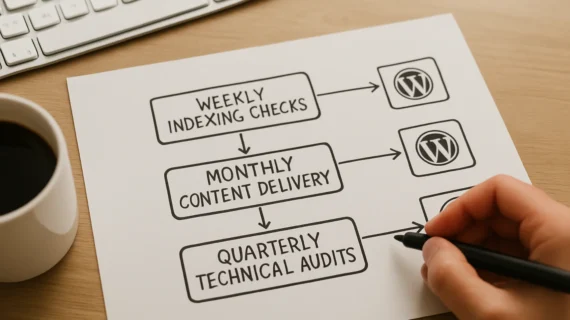
A scalable workflow has three separate layers running on different clocks. Weekly: check indexed page counts in Search Console and crawl errors for each site. Monthly: confirm content was published, record position changes on target keywords, and send a one-page summary to the client. Quarterly: run a full technical audit and review competitor content movement. Collapsing all three into one frantic weekly session per client is the single habit that creates the five-site ceiling most freelancers hit.
Here is what each layer looks like in practice.
Weekly layer (30 minutes across all sites): Open Search Console for each property. Check the Coverage report for a spike in excluded or errored URLs. Check for any manual action notices. This is a monitoring task, not an analysis task. If nothing changed, log it and move on.
Monthly layer (2-3 hours across all sites): Pull a 28-day export from Search Console showing clicks, impressions, and average position for the primary target keywords per site. Confirm that the agreed number of posts were published and went live correctly. Write one paragraph of plain-language commentary per client and send the summary. This is the layer most freelancers try to do weekly, which is why it never gets done well.
Quarterly layer (half day per site): Run a full Screaming Frog crawl. Audit Core Web Vitals. Review what competitor content has moved into positions you are targeting. Adjust the content plan if the evidence warrants it.
The separation matters because each layer requires a different mental mode: monitoring, analysis, and strategy. Mixing them inside the same session means none of them get done at the depth they require.
Indexing First: The Check Most Freelancers Skip Until a Client Complains
A client site can receive 10 published posts and have zero of them indexed. This is not a hypothetical. It happens for a small set of causes that are easy to check and easy to miss if you are not looking.
The most common causes include a noindex directive left on the entire site after a migration, a sitemap that was never submitted to Search Console, and a low-authority domain that Google visits infrequently enough that new content waits weeks before it gets crawled. The common reasons WordPress pages do not get indexed follow a consistent pattern once you know what to look for.
The check sequence is straightforward. Run a site:domain.com search in Google and note the rough page count. Then open the Search Console Coverage report for the same property and compare the number of indexed pages against what you expect. A meaningful gap between those two numbers, or between the indexed count and the total posts published, is the signal to investigate further. Google’s own documentation on sitemaps and crawling explains the mechanics behind crawl budget and sitemap submission if you need to explain the problem to a client.
For the full check sequence a freelancer should run on each client property, the guide on how to check whether Google has indexed your client’s posts covers the steps in order.
A freelancer who is not checking indexed page ratio monthly is billing for content work that may be delivering nothing measurable. The posts exist in the CMS. They do not exist in Google. That is a distinction that matters enormously to the client and tends to surface at the worst possible time if nobody is monitoring it.
How Do You Keep Content Publishing on Schedule Across Multiple Client Sites?
Up to three sites, a shared content calendar with manually drafted and scheduled posts is manageable. Beyond that, the copy-paste step, logging into each WordPress dashboard, uploading images, setting categories, becomes the bottleneck. Direct-publish automation tools, which use the WordPress REST API to push a finished post from a pipeline directly to a live site, remove that step. The result is that publishing cadence holds even when the freelancer is heads-down on another client’s audit.
The two realistic models are worth naming plainly.
Manual scheduling: A content calendar tool (Notion, Airtable, or a simple spreadsheet) tracks what goes out when. The freelancer writes or commissions the post, formats it, and publishes it by hand. This works at three sites. At five, the manual step accumulates and cadence slips.
Automated publishing: A pipeline produces the finished post and pushes it to WordPress via the WordPress REST API. The post goes live on the scheduled date without the freelancer opening the dashboard. Categories, featured images, and metadata are set programmatically. The freelancer’s time is freed for the work that actually requires human judgement.
The practical guide to automating content publishing to WordPress covers the technical setup in detail. Strategift AutoSEO is one implementation of this model, the one Strategift uses across its own portfolio, but the category is broader than any single tool.
Reporting to Clients Without Spending Eight Hours a Month per Site
The reporting trap is building bespoke spreadsheets per client. It feels thorough. It does not scale, and a twelve-tab spreadsheet is a report that gets filed, not read.
A one-page monthly summary built from four Search Console numbers and two Analytics numbers is what actually gets read.
- Search Console, 28-day window: total clicks, total impressions, average position on the primary target keyword, indexed page count
- Analytics: organic sessions, goal completions (enquiry form, phone click, or whatever the conversion event is)
- One paragraph of plain-language commentary: what moved, what did not, and what the plan is for next month
Pulling these numbers manually from each client’s property is a repetitive task. The direction of automation here is data pulls that populate a template automatically, so the freelancer’s time goes into writing the commentary rather than copying numbers from one screen to another. A planned deep-dive on freelance SEO reporting from Search Console will cover this workflow in full when it is published. For now, the principle is: standardise the format across all clients, pull the same six numbers every month, and write one paragraph. That is a report that takes 20 minutes per client, not eight hours.
Technical Audits at Scale: What to Check, How Often, and What to Stop Checking Manually
Not all technical issues affect rankings equally. A triage system stops a freelancer from spending two hours fixing schema markup on a site whose real problem is a 6-second load time on mobile.
Priority order by ranking impact:
- Core Web Vitals (page speed, interactivity, layout stability): check monthly via Search Console’s Page Experience report
- Crawlability: check weekly via Search Console Coverage for new errors
- Broken internal links: run Screaming Frog in list mode weekly against recently published URLs
- Sitemap freshness: verify quarterly that the sitemap is submitted and returning valid URLs
- Schema validity: check quarterly via Google’s Rich Results Test on key page types
A full Screaming Frog crawl quarterly is realistic. Running it monthly per client is not, once you are managing more than three sites. The alternative is continuous monitoring at the platform level, where crawl errors and coverage changes are flagged automatically rather than discovered two months later when a client asks why their traffic dropped.
Where Automation Fits and What It Cannot Replace
Automation handles publishing cadence, keyword research queuing, indexing status checks, and data pulls for monthly reports. These are repetitive and rule-based. They do not require judgement. A tool can do them consistently, without taking a day off or forgetting because a different client called.
Automation does not replace client strategy calls, niche content judgement, or the relationship work that keeps clients retained long enough to generate referrals. Misidentifying the second category as the first is how automation projects produce content that is technically published but commercially useless.
Strategift AutoSEO is the tool Strategift runs across its own portfolio of eight live sites before selling it to anyone. That is the credibility signal: it is not sold on the basis of claimed results for invented clients. The hours recovered come from removing the copy-paste and manual reporting steps. For a detailed breakdown of what an SEO autopilot layer actually does for a WordPress site, the breakdown is there before you commit to anything.
The Practical Ceiling: How Many Sites Can One Freelancer Actually Handle Well?
With purely manual tools: three to five sites is the realistic ceiling before quality and reporting start to slip. This is not a failure of effort. It is a function of hours. At 10 hours per site per month, five sites is 50 hours of billable work plus the administrative overhead of managing five client relationships. There is no room for the checks that prevent problems from compounding.
With a publishing and reporting automation layer in place: eight to twelve sites is achievable, provided the technical audit and client communication work is also systematised. These are estimates based on how the workflow scales, not guarantees. Every client mix is different, and a site in an active technical state requires more reactive hours than a stable one.
The variable that determines whether the upper end is reachable is not the automation tool. It is whether the freelancer has separated the three workflow layers and stopped treating every client task as equally urgent.
Frequently Asked Questions
How many WordPress client sites can a solo freelance SEO realistically manage?
With manual tools and no automation, three to five sites is the realistic ceiling before quality and reporting start to slip. With an automated publishing and reporting layer in place, eight to twelve sites becomes manageable, provided the freelancer systematises client communication and runs technical audits on a fixed quarterly schedule rather than reactively.
What is the most common thing freelance SEOs forget to check across client sites?
Indexed page ratio. A client site can receive ten new published posts and have zero of them indexed if a noindex flag was left on after a migration or if the domain has too low an authority for Google to crawl it quickly. Checking the Search Console Coverage report against a site:domain.com count monthly catches this before the client does.
Should a freelance SEO use WordPress Multisite or separate installs for client sites?
Separate installs are almost always the right answer for freelance client work. Multisite shares a single WordPress core and database, so a plugin conflict or server issue affects every client at once. It also complicates Search Console property management and makes client offboarding significantly harder. Separate installs with a shared monitoring dashboard give isolation with oversight.
What should a freelance SEO include in a monthly client report?
Four numbers from Search Console, 28-day window: total clicks, total impressions, average position on the primary target keyword, and the indexed page count. Add organic sessions and any goal completions from Analytics. One paragraph of plain-language commentary on what moved and why. That is a report a client will read. A twelve-tab spreadsheet is a report that gets filed and ignored.
What SEO tasks are safe to automate across multiple client sites?
Publishing cadence, keyword research queuing, indexing status checks, and data pulls for monthly reports are all safe to automate because they are repetitive and rule-based. Client strategy, niche content judgement, and the relationship work that retains clients are not automatable. Misidentifying the second category as the first is how automation projects produce content that is technically published but commercially useless.
How often should a freelance SEO run a full technical audit on a client’s WordPress site?
Quarterly is the realistic minimum for a full crawl covering broken links, page speed, sitemap freshness, and schema validity. Monthly spot-checks on Core Web Vitals and Search Console coverage reports catch acute problems before they compound. Weekly automated checks on crawl errors and manual penalty notices complete the triage system without requiring a full audit every month.
If you are at three or four clients and already feeling the ceiling, the publishing and reporting steps are where the hours go. See how AutoSEO handles publishing and reporting across client sites and start a free account to test it on one site before rolling it across your client roster.